

A cover and page designer that knows KDP's rules
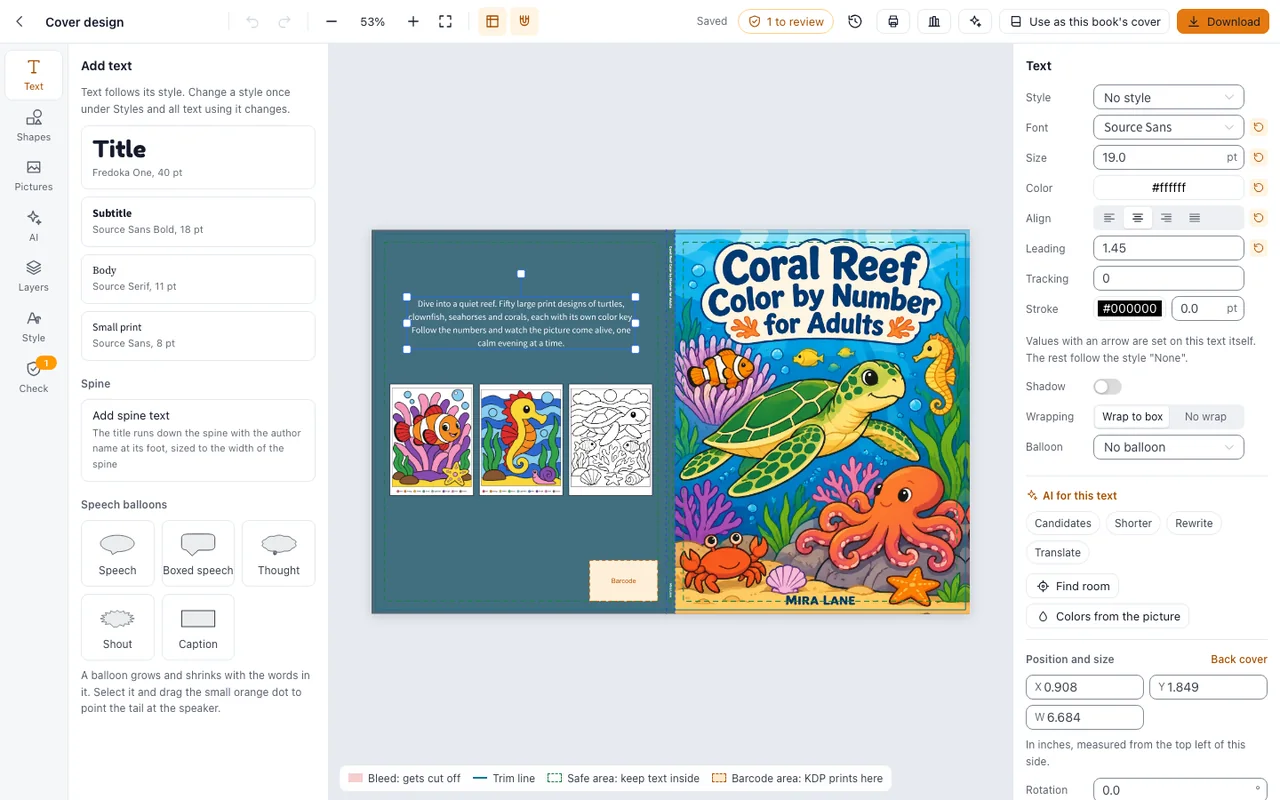
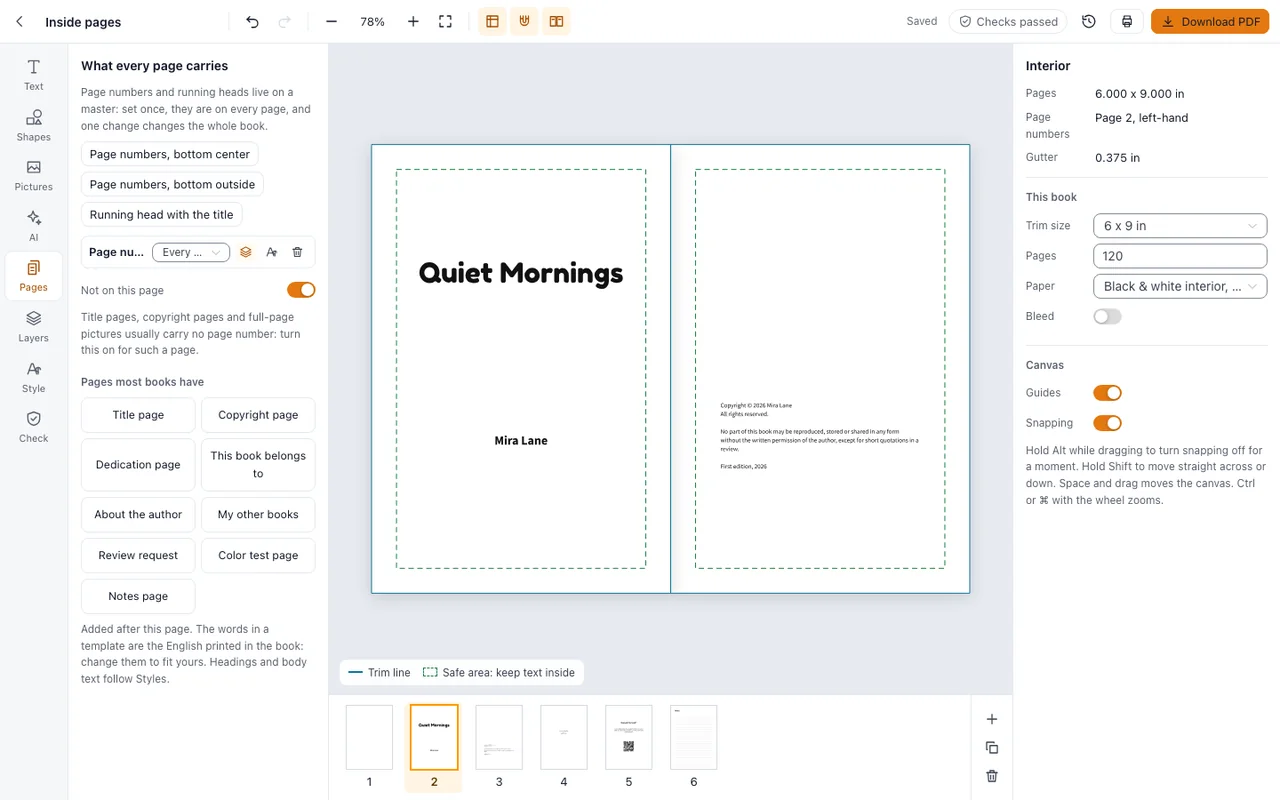
Open a book's cover or its pages as a design and change anything: text, pictures, shapes, layers. The canvas knows KDP's numbers, so the spine follows the page count, the barcode area stays marked and a print check runs after every save. The preview you see before export is cut from the print PDF itself.
The designer costs nothing to use. Layouts, copy suggestions, finding room for text and the print check are free; a picture drawn or changed by AI is 1 credit.
How it is made
Open a design
From the cover a book has now, from its drawn pages, or from a blank sheet sized for a trim size, a page count and a paper.
Change what you want
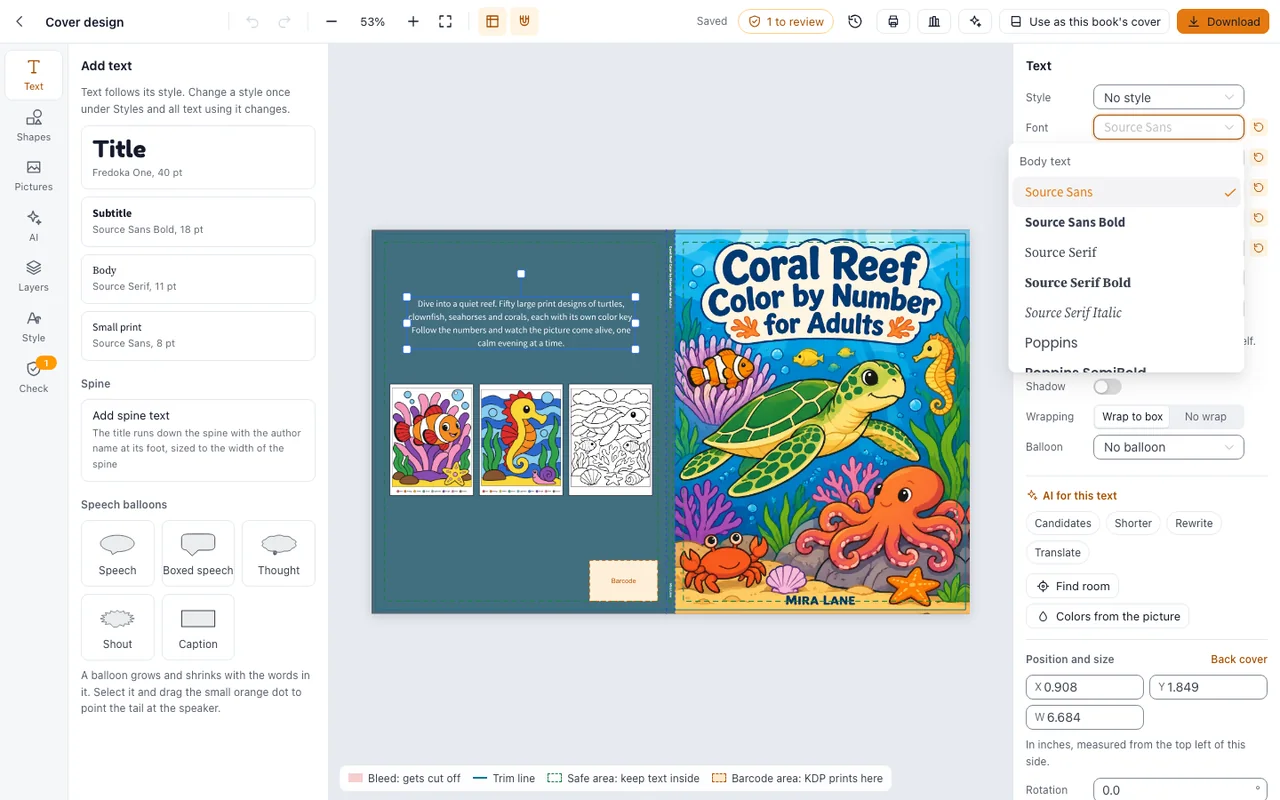
Drag, resize, rotate, crop, layer. Text follows styles, so one change to "Title" changes every title. Elements snap to the trim line, the safe area and each other.
Read the print check
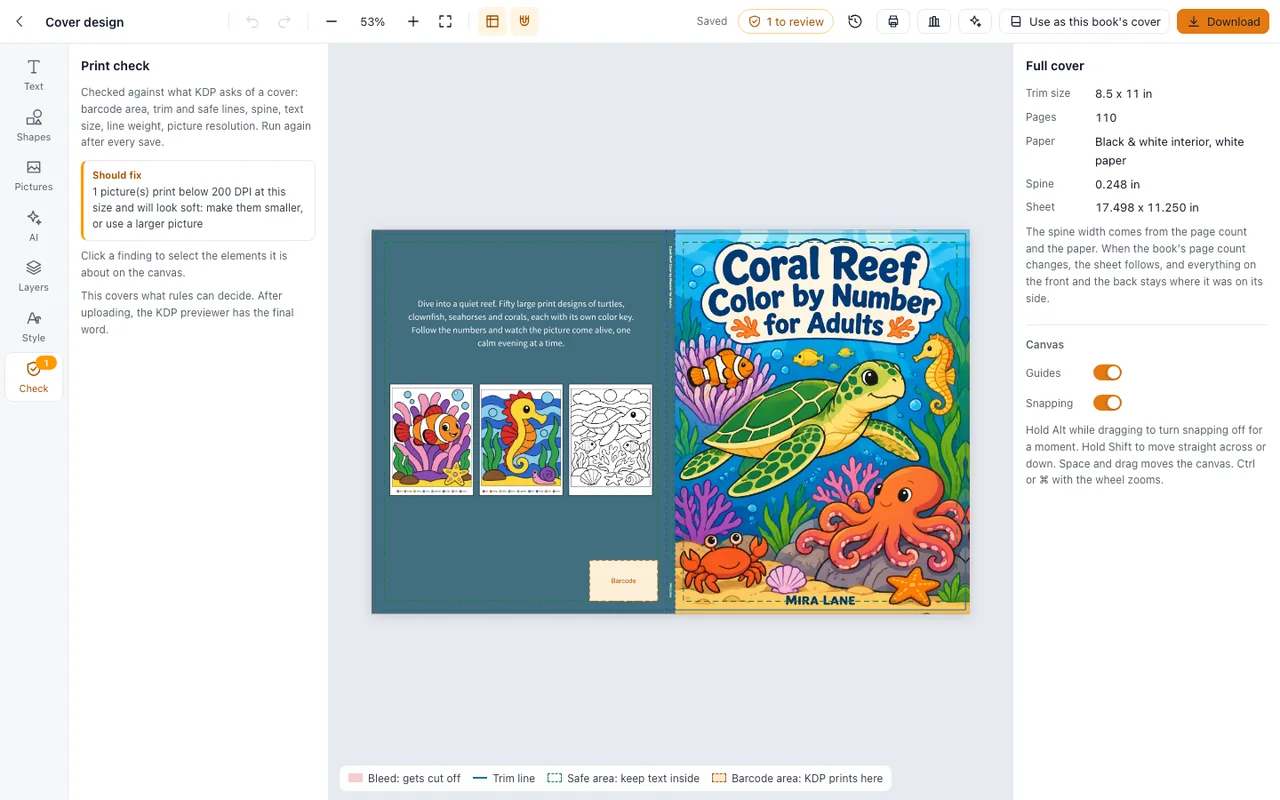
Text over the barcode area or outside the trim, type under 7 points, thin lines, pictures under 200 DPI, spine text on a book too thin for it.
Use it
Make the design the cover the book is exported with, or download the print PDF and the Kindle cover JPG from the designer.
What it looks like
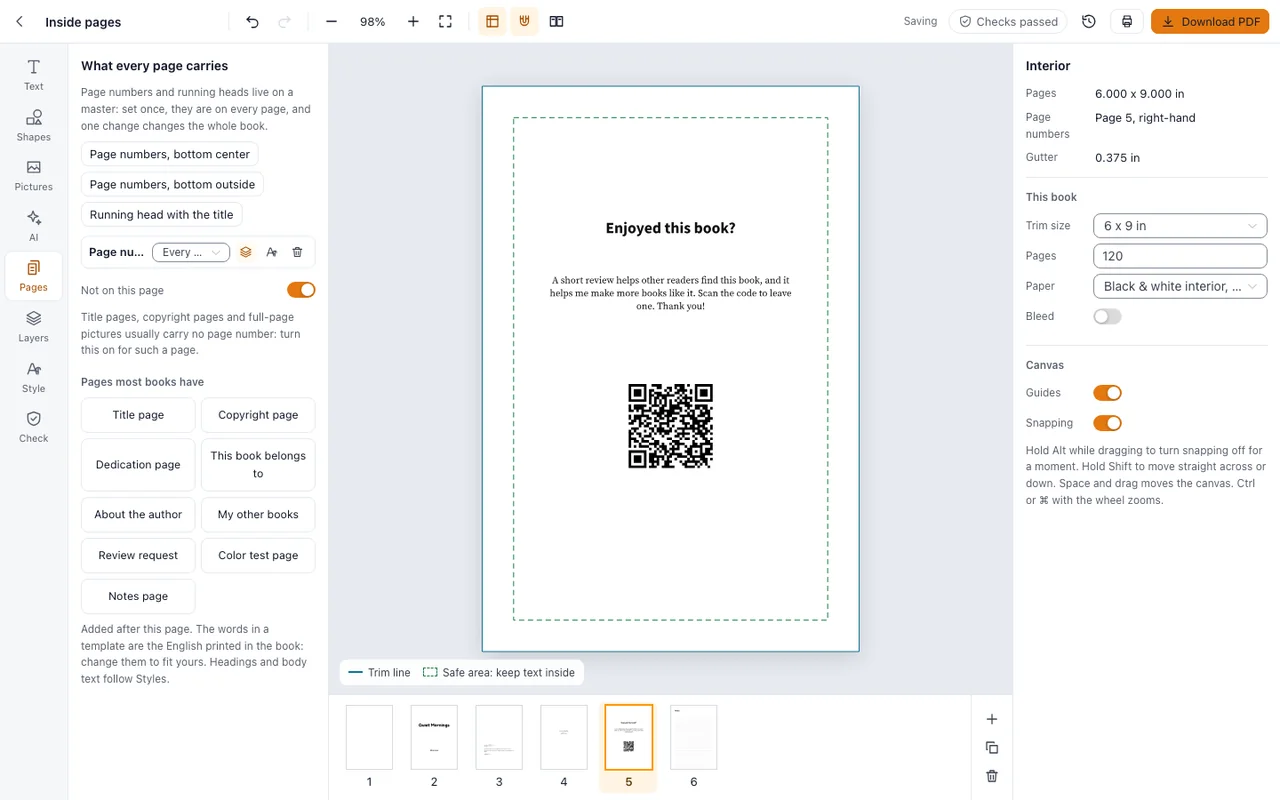
Real screenshots of the designer, resized only.
The details
- A cover that follows the book
- Back cover, spine and front are one sheet whose width comes from the page count and the paper. What you put on the front or the back is measured from that side, so when the page count changes and the spine widens, everything stays where it was. Text on the spine is offered from 80 pages, which is KDP's rule.
- Screen and print from one source
- A design is data in inches, not a screenshot of the canvas. The canvas and the print file are both drawn from it with the same text layout and the same font files, and letters are placed as outlines, so there is no font to embed and no reflow at the printer.
- Inside pages
- Masters carry page numbers and running heads onto every page, mirrored on left-hand pages. Nine ready pages: title, copyright, dedication, "This book belongs to", about the author, other books, a review request with a QR code, a color test page and a notes page. Writing areas (lines, dots, grid, handwriting guides, tables) keep their spacing when resized. Speech, thought and shout balloons are text with a tail you drag.
- AI where it saves work
- On a picture: draw it again, change one thing, paint outward to fill a side to the bleed, cut the subject out, or draw a small asset on its own; each is 1 credit, taken only when the picture arrives. On text: candidates for the title, the subtitle and the back cover, and shorten, rewrite or translate for what is selected, at no charge. "Find room" measures the picture and puts the words where it is calmest, dark or light as needed. Six one-click layouts for covers and three for pages set the type sizes by measuring.
- The cover check and the shelf test
- The cover check shows the cover to a vision model at the size of a search result and brings back scores with what to change, most useful first. When the title is a text of the design it also measures how tall the title is at that size, its contrast against what is behind it and how much of the width it takes. Free, ten a day. The shelf test shows your cover among covers that rank for a search phrase, at desktop and phone size. Other books' covers are shown beside yours for comparison only and never go into a design.
- What goes into a design
- Pictures you upload, the pages and covers of your own books, and pictures the AI tools draw for you. There is no stock library of pictures.
- Limits
- Text effects are an outline and a hard shadow; gradients and curved text are not offered because they would not print as shown. Pages designed here are downloaded from the designer and are not yet used by the Studio's one-click export. Fonts cannot be uploaded. Made for a desktop browser with a mouse.
Price
The Studio is paid for with credits, apart from the plans. You pay for what is made; what fails is not charged.
| What | Credits | About |
|---|---|---|
| A picture drawn or changed by AI in the designer | 1 | $0.02 to $0.04 |
| Designing, layouts, copy suggestions, finding room, print check, downloads | Free | |
| Cover check | Free, 10 a day | |
Never charged: writing and editing what each page shows, reordering, uploading your own pictures, front and back matter, AI polish of your texts, KDP category suggestions, the whole-book preview, automatic redraws after a failed check, exporting and downloading again.
Credit packs
- 100 credits$3.99
$7.99Members $3.19 - 300 credits$9.99
$19.99Members $7.99 - 800 credits$22.49
$44.99Members $17.99 - 2,000 credits$49.99
$99.99Members $39.99
Every credit pack is 50% off now. Members on a paid plan pay 20% less for every pack. Paid plans include credits every month: Creator 30, Pro 300, Team 600. See the plans
Know this before you start
- Whether a book passes review and how it sells is decided by Amazon and the market. Sales figures on KDPTop are estimates from sales rank.
- The pictures are drawn by an AI model. How far copyright protects AI-generated work is unsettled in most countries, and KDP asks at upload whether the content is AI-generated: answer truthfully.
- Read every page before you publish, above all in a book for children.
- No trademarks, brand names, film or game characters, or real people. A word list stops the common ones; what it misses is still yours to catch.
- The files are for KDP paperbacks; picture books and comics also come with a fixed-layout EPUB for Kindle, chapter books with a reflowable one. Books meant to be written or drawn in do not suit Kindle according to KDP's content guidelines, and the larger cover file a hardcover needs is not exported.
- You upload to KDP, set the price and publish yourself. KDPTop does not publish for you.
Common questions
Will the print look like what I see?
The canvas and the print file are drawn from the same data with the same fonts and the same layout code, and the "as it prints" preview is rendered from the print PDF. Color on paper still differs from a screen, as it does for any printed book: order a proof.
Do I have to make the book in the Studio?
No. Start a blank cover for any trim size, page count and paper, or blank inside pages, and download the PDF. A design that belongs to a book made here follows that book's page count and can be set as its cover.
Can I use my own fonts or a stock photo library?
Not now. The 36 typefaces are open-licensed ones we checked one by one for use in books that are sold. Pictures are yours to upload or to have drawn.
Does a failed AI picture cost credits?
No. The credit is held when you ask and taken only when the picture arrives. A picture that fails, is refused by the model or times out costs nothing.
Further reading: How to make a coloring or puzzle book for KDP (trim, bleed, spine)KDPTop Studio next to other book makers
The Studio also makes
A cover and page designer that knows KDP's rules
The designer costs nothing to use. Layouts, copy suggestions, finding room for text and the print check are free; a picture drawn or changed by AI is 1 credit.
Open the designer